

For a long time, Chromebooks weren’t considered gaming devices.
Most people bought them for school, work, web browsing, and streaming. If someone asked about gaming on a Chromebook a few years ago, the answer was usually simple: “Get a different laptop.”
That’s no longer true.
Modern Chromebooks are far more capable than many people realize. Between browser games, Android apps, and cloud gaming services, there are now thousands of games that run surprisingly well on ChromeOS.
In fact, some of the most enjoyable Chromebook games don’t require expensive hardware at all.
Whether you’re a student looking for something fun between classes, a casual gamer who wants quick entertainment, or someone trying to get more out of their Chromebook, you’ll find plenty of great options.
This guide covers the best games for Chromebook, including action games, strategy games, multiplayer experiences, puzzle games, and browser-based favorites that work smoothly on most devices.
Can You Really Game on a Chromebook?
Absolutely.
Many people still assume Chromebooks can only handle basic tasks, but today’s models support several gaming options:
- Browser games
- Android games from Google Play
- Cloud gaming services
- Linux-supported games
- Progressive web apps
The experience varies depending on your Chromebook model, but most users can enjoy a wide variety of games without any major issues.
The key is choosing games that match your device’s capabilities.
Quick Comparison of the Best Games for Chromebook
| Game | Genre | Works in Browser | Android App | Best For |
|---|---|---|---|---|
| Roblox | Sandbox | No | Yes | Creativity |
| Minecraft | Adventure | No | Yes | Exploration |
| Among Us | Social Deduction | No | Yes | Multiplayer fun |
| Stardew Valley | Farming RPG | No | Yes | Relaxing gameplay |
| Brawlhalla | Fighting | Yes | Yes | Competitive gaming |
| Krunker | FPS | Yes | No | Fast action |
| Run 3 | Endless Runner | Yes | No | Casual gaming |
| Asphalt 9 | Racing | No | Yes | Racing fans |
| Terraria | Sandbox | No | Yes | Adventure lovers |
| Chess.com | Strategy | Yes | Yes | Strategic thinkers |
1. Roblox
Few games are as popular among Chromebook users as Roblox.
What makes Roblox special is that it isn’t just one game. It’s a platform filled with millions of player-created experiences.
One day you might be exploring an adventure game. The next day you’re managing a virtual business or competing in an obstacle course.
Why Chromebook Users Love It
Roblox runs surprisingly well on many Chromebooks and offers endless variety.
Pros
- Massive game library
- Free to play
- Multiplayer support
- Frequent updates
Cons
- Performance varies by Chromebook
- Some experiences require in-game purchases
2. Minecraft
Minecraft remains one of the most influential games ever created.
Despite being more than a decade old, millions of players continue building, exploring, and surviving in its blocky world.
For Chromebook users, Minecraft offers hundreds of hours of gameplay.
You can:
- Build creative structures
- Explore caves
- Play with friends
- Create custom worlds
Why It’s Worth Playing
Minecraft rewards creativity more than almost any other game.
No two players experience it exactly the same way.
3. Among Us
At first glance, Among Us seems simple.
A group of players completes tasks while trying to identify hidden impostors.
The reality is far more entertaining.
The discussions, accusations, and unexpected betrayals create some of the funniest multiplayer moments you’ll experience.
Best For
- Friend groups
- Online gaming sessions
- Casual multiplayer fun
4. Krunker
If you’re looking for a fast-paced shooter that works directly in a browser, Krunker is one of the best options available.
What surprised me most about Krunker was how smooth it felt.
Most browser shooters struggle with performance.
Krunker doesn’t.
Matches start quickly, movement feels responsive, and the gameplay remains surprisingly competitive.
Why It Stands Out
- No download required
- Fast matchmaking
- Active community
- Browser-friendly performance
5. Stardew Valley
Not every game needs explosions and competition.
Sometimes you just want to relax.
That’s where Stardew Valley shines.
You inherit a small farm and slowly transform it into a thriving property.
Along the way you’ll:
- Grow crops
- Raise animals
- Meet townspeople
- Explore caves
The game moves at your own pace, which makes it perfect for Chromebook users who want a more relaxing experience.
6. Run 3
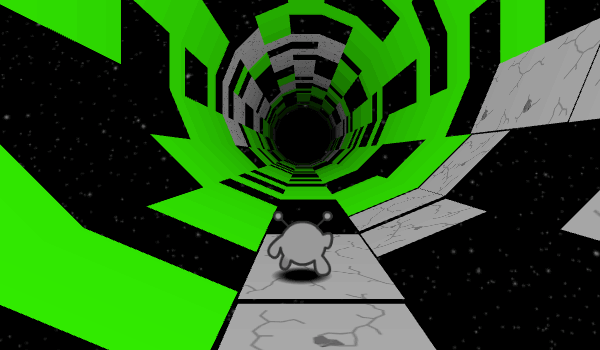
Run 3 is one of those browser games that looks simple but quickly becomes addictive.
Players guide a small alien through tunnels floating in space while avoiding gaps and obstacles.
The gravity mechanics make every level feel unique.
Many students discover Run 3 at school and continue playing it for years afterward.
7. Brawlhalla
Fans of competitive fighting games should definitely try Brawlhalla.
The gameplay is easy to learn but difficult to master.
Matches are fast, chaotic, and highly replayable.
Why Chromebook Gamers Enjoy It
Brawlhalla offers a polished multiplayer experience without demanding high-end hardware.
8. Asphalt 9
For racing fans, Asphalt 9 is one of the best-looking games available on ChromeOS.
The cars feel fast, the tracks are exciting, and the graphics are impressive considering the hardware limitations of many Chromebooks.
Highlights
- Stunning visuals
- Multiple game modes
- Online multiplayer
- Large car collection
9. Terraria
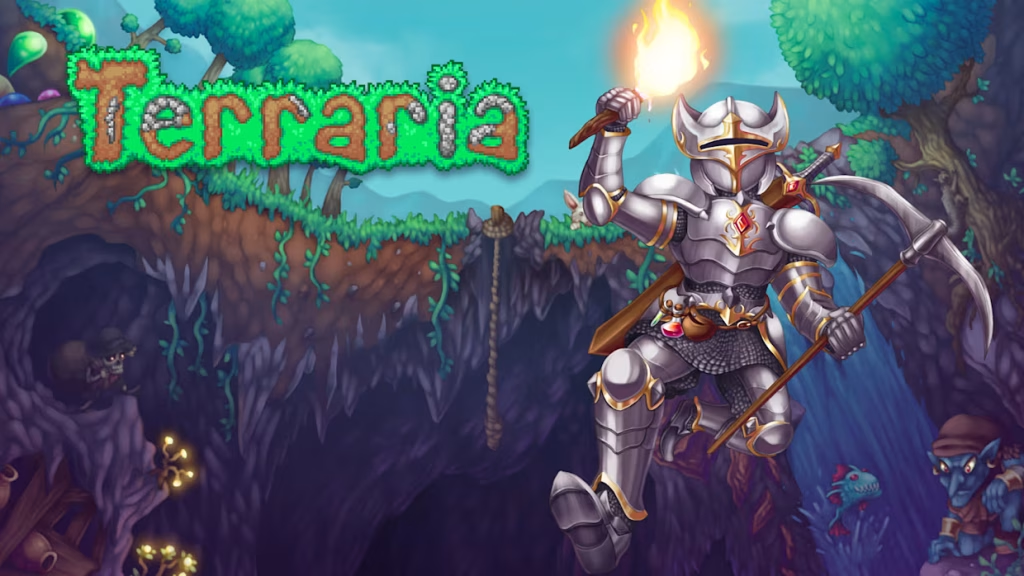
Many people describe Terraria as a 2D version of Minecraft.
While that’s partly true, Terraria has its own identity.
The game combines:
- Exploration
- Crafting
- Combat
- Boss battles
Players can spend hundreds of hours discovering new content.
10. Chess.com
Sometimes the best games are the simplest.
Chess has remained popular for centuries because every match feels different.
The browser version allows Chromebook users to:
- Play online
- Solve puzzles
- Learn strategy
- Compete against players worldwide
Best Chromebook Games by Category
Best Multiplayer Games
- Roblox
- Among Us
- Brawlhalla
- Krunker
Best Browser Games
- Krunker
- Run 3
- Chess.com
Best Relaxing Games
- Stardew Valley
- Minecraft
Best Competitive Games
- Brawlhalla
- Krunker
- Chess.com
Best Racing Games
- Asphalt 9
Tips for Better Chromebook Gaming
Keep ChromeOS Updated
Performance improvements often come through system updates.
Close Unused Tabs
Too many open tabs can slow down gaming performance.
Use Stable Internet
Browser and cloud games depend heavily on a reliable connection.
Check Game Compatibility
Some games run better through Android apps while others perform best in a browser.
Frequently Asked Questions
What are the best games for Chromebook?
Popular choices include Roblox, Minecraft, Krunker, Stardew Valley, Among Us, and Run 3.
Can Chromebooks run games well?
Yes. Modern Chromebooks can handle browser games, Android games, and cloud gaming services surprisingly well.
Are there free Chromebook games?
Absolutely. Roblox, Krunker, Run 3, Chess.com, and Brawlhalla are excellent free options.
What is the best browser game for Chromebook?
Krunker is one of the strongest browser-based options thanks to its smooth gameplay and active community.
Can you play Minecraft on a Chromebook?
Yes. Many Chromebooks support Minecraft through Android or Linux installations.
Are Chromebooks good for casual gaming?
Yes. They are especially well-suited for browser games, puzzle games, multiplayer titles, and cloud gaming.
Final Thoughts
Gaming on a Chromebook has improved dramatically over the past few years.
What was once considered a device mainly for school and productivity can now deliver surprisingly enjoyable gaming experiences.
Whether you prefer building in Minecraft, competing in Krunker, relaxing in Stardew Valley, or exploring Roblox, there are more great Chromebook games available than ever before.
The best part is that many of them are free, easy to access, and don’t require expensive hardware.
If you’re looking to get more value from your Chromebook, any of the games on this list is a great place to start.
